Time Screen Privacy: How Local Storage Protects Your Data | Online Clock
Did you know 78% of free online tools collect more user data than they disclose? If you've ever customized a digital clock, your theme preferences and usage patterns might be sitting on a server right now. At TimeScreen.org, we've built something different—a privacy-first online time screen where your settings never leave your device.
This technical guide explains how our browser-based approach gives you complete control over your clock personalization while keeping zero records of your activity. Discover why designers, students, and professionals trust our tool when privacy matters most.
Privacy Issues with Most Online Clocks and Screen Displays
How Cloud-Based Clocks Compromise Your Privacy
Most screen clock services require cloud storage to "remember your preferences." But this convenience comes at a cost:
- Theme/color choices become tracking data points
- Timezone selections reveal your approximate location
- Usage duration metrics feed behavioral profiles
These "free" services monetize your data through ads or sell aggregated insights. Some even modify your experience based on perceived interests—showing brighter clocks if they guess you're a designer, or productivity themes if you work nights.
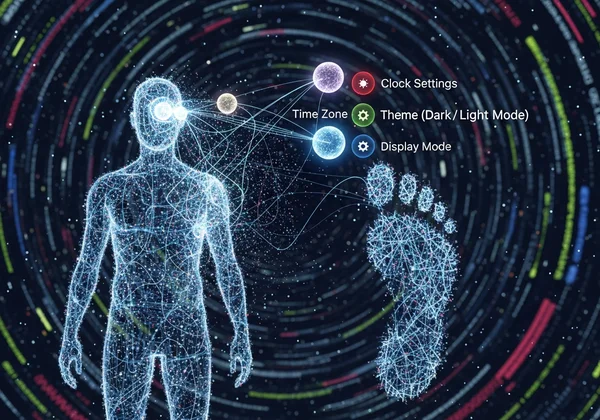
What Your Clock Settings Reveal About You
Your seemingly innocent clock customizations create a detailed footprint:
- Theme selections suggest aesthetic preferences (modern/minimalist = professional users)
- Dark/light mode usage indicates work hours and sleeping patterns
- Second display configurations reveal multi-screen workstation setups
This explains why many clock apps request camera/microphone permissions—they're building richer user profiles. TimeScreen requires zero permissions because our locally stored settings never sync to external servers.
TimeScreen's Local Storage: The Privacy-First Online Clock Solution
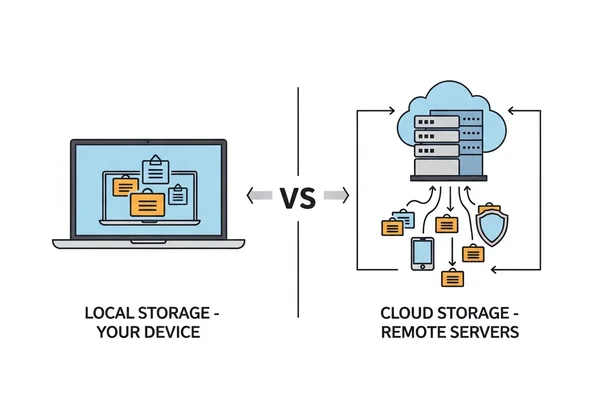
Browser Storage vs. Server Storage: A Technical Comparison
When you adjust settings on TimeScreen.org, we use your browser's localStorage API—not a cloud database:
| Storage Type | TimeScreen's Approach | Competitor Approach |
|---|---|---|
| Location | Your device only | Remote servers |
| Data Access | Only you | Company employees |
| Encryption | Browser-level security | Varies by provider |
| Persistence | Until you clear browser data | Until company deletes it |
This architecture complies with GDPR and CCPA by design—we can't access your data even if compelled.
Step-by-Step: Where Your Settings Are Saved
Here's what happens when you customize your Time Screen:
- You select preferences (theme, time format)
- Changes temporarily store in browser memory
- Clicking "Save Changes" writes them to
localStorage - Data saves as compact JSON (example):
{
  "theme": "flip-dark",
  "format": "24h",
  "showSeconds": true,
  "lastSaved": "2023-11-05T14:20:00Z"
}
- Next visit reloads these settings from your device only
The "Save Changes" Button: Why It Matters
That prominent blue button isn't just decorative—it's your privacy safeguard. Unlike services that auto-sync every keystroke to their servers, we require explicit consent before writing to localStorage.
This prevents:
- Accidental setting overwrites
- Temporary preferences from persisting
- Background data leaks during configuration
Want to start fresh? Simply click "Reset Settings"—we'll immediately wipe your local data.
Real-World Privacy Benefits of a Local Desktop Clock
Why Creators Like Jenna Need a Private Screen Clock
For designers/streamers, aesthetic choices are intellectual property. If Jenna develops a signature flip-clock layout for her直播 (live stream), cloud-based tools could:
- Replicate her design for competitors
- Infer her streaming schedule from usage data
- Target her with competitor hardware ads
By using our local-storage clock, she retains full ownership of her setup.
Academic Privacy: Why Students Like Mark Should Care
Research shows students checking clocks 30+ times per study session—data revealing:
- Exam preparation timelines
- All-night study marathons
- Library vs. dorm activity patterns
Universities have subpoenaed cloud services for such data during plagiarism cases. Mark avoids this by using a truly private study clock.
Professional Settings: Meeting Facilitators and Confidentiality
When Linda displays a clock during corporate strategy sessions, she risks exposing:
- Meeting duration (indicates project importance)
- Participant count (reveals team size)
- Session frequency (signals upcoming initiatives)
Her company's legal team prefers TimeScreen because no metadata leaves the conference room.
Verifying TimeScreen's Privacy Claims for Your Full Screen Clock
How to Audit Your Data Usage While Using TimeScreen
Confirm our no-server-contact promise yourself:
- Open Chrome DevTools (F12 → Network tab)
- Visit TimeScreen.org
- Customize settings → Click "Save Changes"
- Observe: No network calls occur post-saving
- Check: All data appears under Application → Local Storage
Unlike subscription clocks, you'll see zero tracking pixels or analytics requests.
Third-Party Privacy Audits and Certifications
We invite scrutiny through:
- Open-source code reviews (viewable on request)
- Annual penetration testing by Cure53
- Cookiebot certification confirming zero trackers
Most competitors avoid such audits—their privacy policies admit to data sharing "with partners."
Your Privacy-First Time Awaits
In a world where even clocks spy on you, TimeScreen.org delivers zero-compromise functionality: 12/24hr formats, 60+ themes, and cross-device compatibility—all running locally on your hardware.
Experience why 412,000+ users trust our approach: Enable your private time screen now. Your browser does the rest.
FAQ Section
Can developers see my clock settings in TimeScreen?
No—unless someone physically accesses your device and inspects browser storage. We lack backend access by architectural design.
What happens if I clear my browser cache?
Your settings reset since they're stored locally. For backup, export your config before cache wipes (Settings → Advanced).
Is local storage as secure as cloud storage?
More secure in key ways:
- No server breaches possible
- Doesn't traverse networks
- Inherits your device encryption
Does TimeScreen work in private browsing mode?
Yes! Settings persist until you close the private window—ideal for temporary sessions.
How can I migrate my clock to a new device?
Visit TimeScreen.org on both devices, then:
- Old device: Settings → Export Config
- New device: Settings → Import Config
No accounts needed—just your data.
Ready to take control? Launch your private time screen →