TimeScreen Privacy: Local Storage vs Cloud Clocks
Your screen is central to how you navigate your day—whether you're writing notes, attending meetings, or just keeping track of time. But have you considered what happens to your data when you use simple online tools? It’s a valid concern. Many people worry about their digital footprint and how companies use their personal information. When you just want a simple clock on your screen, privacy shouldn't be a trade-off.
This article explores the hidden world of online clock tools and their privacy practices. We'll explain the difference between cloud-based clocks that track you and privacy-first solutions that don't. You will learn why a seemingly harmless clock app can pose privacy risks and how a different approach can protect your information.
That's where TimeScreen.org changes the game. With a focus on privacy and simplicity, TimeScreen.org provides a secure and elegant time display. You can experience it now and see how a commitment to privacy enhances your digital space, keeping your preferences safe on your own device.
The Privacy Problem with Online Clock Tools
When you search for a "full screen clock" or "online clock," you're looking for a simple utility. However, many free online tools come with a hidden cost: your data. It's a common business model where "free" means the service is paid for with user information, which can be sold to advertisers or used for marketing profiles.
This practice isn't limited to complex applications. Even a simple browser clock can be designed to gather information about your habits, location, and device. Understanding this is the first step toward making a more informed and secure choice for your digital tools.
How Most Online Tools Collect Your Data
Many free web applications use scripts and cookies to track your behavior. When you visit a site, it might record your IP address, browser type, screen resolution, and even your mouse movements. If you customize a tool—like changing a clock's theme or color—those preferences are often saved to a remote server tied to a unique identifier.
This data collection allows companies to build a detailed profile about you. They learn what you like, when you are most active, and what kind of user you are. This information is valuable for targeted advertising and market research. While some data collection is for improving the service, much of it is for commercial gain, often without your explicit and informed consent.
Why Clock Apps Might Seem Harmless But Aren't
You might wonder, "What harm can a clock app do?" On its own, knowing you prefer a 24-hour format isn't a major privacy breach. However, when combined with other data points, it becomes part of a larger puzzle. For example, if a clock app logs your active hours, it learns your daily schedule. If it records your location via your IP address, it knows where you live or work.
This aggregated data can be surprisingly revealing. A service might infer your work-life balance, sleep patterns, and even your location patterns over time. For users who value their privacy, such as streamers who want to keep their location private or professionals handling sensitive work, this background tracking is an unnecessary risk. A simple tool for displaying the time should not double as a surveillance device.
How TimeScreen's Local Storage Works
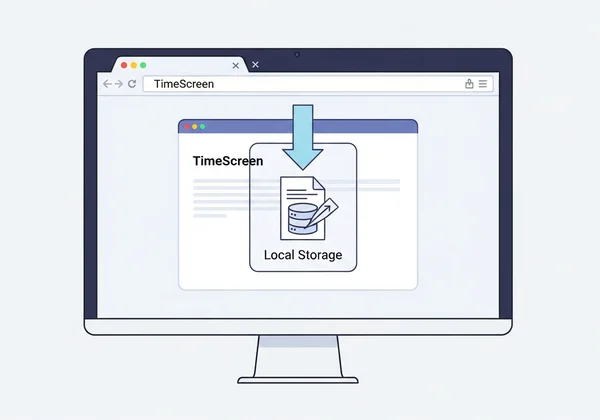
In stark contrast to cloud-based tools, TimeScreen.org is built on a "privacy-first" principle. The core of this commitment is the use of local storage. This means all your customizations and settings are saved directly in your browser on your own computer, not on our servers. We don't have access to your preferences, and we don't track your usage.
This approach puts you in complete control. It's a simple, transparent, and secure method that respects your digital autonomy. Let's break down what this means for you and how this technology powers a truly private online clock.
Your Settings Stay on Your Device
When you customize your clock on TimeScreen.org—choosing the Flip Clock theme, dark mode, or hiding the date—we remember your preferences. This ensures your choices are there for your next visit. Instead of sending this data to a remote cloud server, our tool uses your browser's built-in "Local Storage."
Think of it as a small, private file on your computer that only TimeScreen.org can read when you visit the site. After you click "Save Changes," your unique settings are stored locally. The next time you open our site, it checks this local file and instantly loads your preferred layout. Your data never leaves your device. It’s your clock, your screen, and your settings—and they stay that way. To see how simple this is, you can customize your clock right now.
The Technology Behind Privacy-First Clocks
The technology enabling this is a standard web feature, but its application is a deliberate choice. While many developers opt for server-side databases to collect user data, we consciously chose a client-side solution. A no-tracking clock like ours doesn't need to know who you are to function perfectly.
By avoiding server-side accounts and user profiles, we eliminate the risk of data breaches on our end. There are no user databases to be hacked because no user data is stored with us. This design philosophy is fundamental to building trust. We provide a beautiful and functional tool without asking for anything in return, especially not your private information.
Benefits of Local Storage for Your Clock Experience
Choosing a tool that uses local storage isn't just about privacy; it also brings practical benefits that improve the user experience. A privacy-first design often leads to a faster, more reliable, and more personal tool. You get the peace of mind that comes with security, plus a smoother and more consistent clock display.
Here are the key advantages of using a local storage clock like TimeScreen.org for your daily needs, whether for studying, working, or presenting.
No Tracking Means Better Performance
Cloud-based clocks constantly communicate with a server. They send your usage data, request your saved settings, and load tracking scripts. This back-and-forth communication consumes bandwidth and can slow down your browser, especially on weaker connections or older devices.
TimeScreen.org stores settings locally. This eliminates the need for extra network requests. As a result, your clock loads instantly with your preferences while using minimal system resources. This lightweight design ensures a fast, responsive experience every time. Your full screen clock will be smooth and reliable, without the performance lag caused by unnecessary data tracking.
Your Customizations Are Always Yours
With cloud-based services, your settings are tied to an account. If you lose your login information or the service shuts down, your carefully curated customizations are gone forever. Furthermore, you are dependent on their servers being online and responsive to access your preferences.
With TimeScreen.org's local storage approach, your settings are as durable as your own browser data. As long as you don't clear your browser's site data, your favorite theme and format will be waiting for you. This makes the experience more personal and dependable. Your perfect desktop clock setup remains intact, independent of any external servers. You can design your setup and trust it will be there tomorrow.
What You Give Up with Cloud-Based Clocks
At first glance, a cloud-based clock might seem convenient, especially if it syncs settings across devices. However, this convenience often comes with significant trade-offs that aren't immediately obvious. You give up a degree of privacy, security, and sometimes even a stable user experience.
Understanding these hidden costs is crucial for anyone who cares about their digital well-being. By comparing these drawbacks to the benefits of a private online clock, you can make a choice that aligns with your values.
The Hidden Costs of "Free" Clock Apps
The saying "If you're not paying for the product, you are the product" is especially true for many free online tools. The "cost" of a free cloud clock is often your personal data. This data is used to serve you ads, influence your online experience, or is sold to third-party data brokers.
You also give up control. The company can change its privacy policy at any time, deciding to collect more data than before. They can also clutter the interface with ads or "premium" upsells, degrading the simple, focused experience you were looking for. With a tool like TimeScreen.org, what you see is what you get: a clean, ad-free clock with a transparent privacy model.
When Cloud Storage Actually Hurts Your Clock
A reliance on cloud storage can make a simple tool surprisingly fragile. If you have an unstable internet connection, a cloud-based clock might fail to load your settings or even display the time correctly. If the service's servers are down for maintenance or experiencing technical issues, your clock is unusable.
Additionally, syncing settings across devices can create bugs. A setting that works perfectly on your desktop might not display correctly on your laptop, especially if the screen sizes differ. A local storage clock avoids these issues entirely. It works perfectly offline (after the first visit) and is tailored to the specific device you are using, ensuring a stable and predictable experience every time.
Make the Privacy-First Choice for Your Time Display
In an age of constant data collection, choosing tools that respect your privacy is more important than ever. A simple online clock shouldn't compromise your security or track your habits. As we've seen, the difference between a cloud-based clock and one that uses local storage is significant.
Here's what matters most:
- Your Data is Valuable: Many "free" tools are funded by collecting and monetizing your personal information.
- Local Storage is Power: By keeping your settings on your device, you retain control and protect your privacy.
- Privacy Enhances Experience: A no-tracking approach leads to a faster, more reliable, and cleaner tool.
You don't have to trade privacy for a great-looking, functional screen clock. TimeScreen.org was built to give you both. We believe in providing a simple, stylish, and always-accurate time display without ads or tracking.
Ready to experience a clock that puts your privacy first? Visit https://timescreen.org today, customize your perfect clock, and enjoy the peace of mind that comes with knowing your settings are yours alone.

Frequently Asked Questions About Clock Privacy
Is my clock data really private with TimeScreen?
Yes, absolutely. TimeScreen.org uses your browser's local storage, which means all settings—like your chosen theme, 12/24-hour format, or date visibility—are saved only on your computer. We do not have servers to collect, store, or analyze any of your personal preferences or usage data.
Can I use TimeScreen on multiple devices with my settings?
Because settings are stored locally on each device's browser, they are not automatically synced between your computer, phone, or tablet. You would need to configure your preferred settings on each device individually. This is a direct consequence of our privacy-first design, as syncing would require a central server to store your data.
How does local storage affect my device's performance?
Local storage has a negligible impact on your device's performance. The amount of data stored is tiny—just a few kilobytes of text to remember your settings. It is far less resource-intensive than the cookies, tracking scripts, and constant server requests used by many other websites, making our private online clock exceptionally lightweight and fast.
Are there any security risks with local storage?
Local storage is a standard, secure feature of all modern web browsers. The data stored by a website is sandboxed, meaning only that specific website (in this case, TimeScreen.org) can access it. Other websites cannot read your clock settings. It is a much safer model than storing personal preferences on a remote server that could be targeted by hackers.